How to Apply for KRA PIN Online in 2026: The Complete iTax Registration Guide
Get High Paying Surveys
Earn money online by completing simple surveys. No experience needed.
Start Earning →Quick Summary
- Apply for a KRA PIN online at itax.kra.go.ke — the process is fully online for individuals
- You need a valid national ID (or passport), an active email address, and a phone number
- KRA PIN registration is free — you pay nothing
- For individual applicants, the PIN is issued instantly after successful submission
- Companies and non-residents follow a slightly different process (covered in this guide)
- Your KRA PIN is required for employment, banking, filing taxes, applying for tenders, buying property, and more
Introduction: Why Every Kenyan Needs a KRA PIN
If you have recently gotten a job, opened a business, started freelancing, or are simply becoming financially active in Kenya, you will very quickly discover that everyone asks for your KRA PIN. Banks ask for it. Employers ask for it. The government asks for it. Even some landlords ask for it.
The KRA PIN — Kenya Revenue Authority Personal Identification Number — is a unique tax identifier assigned to every taxpayer in Kenya. It is issued by the Kenya Revenue Authority through the iTax platform and is mandatory for dozens of transactions in daily Kenyan life.
The good news is that applying for a KRA PIN online is one of the fastest and most straightforward government processes in Kenya today. You can do it from your phone in under 20 minutes — and it costs absolutely nothing.
This guide covers everything you need to know: the requirements, the exact iTax registration steps, what to do after you get your PIN, and the most common mistakes people make that can cause delays or errors.
What Is a KRA PIN and Why Does It Matter in Kenya?
A KRA PIN is an alphanumeric code (e.g., A123456789B) that uniquely identifies you as a taxpayer with the Kenya Revenue Authority. It is tied to your national ID number and stays with you for life — you do not need to renew it.
You will need your KRA PIN for:
- Opening a bank account (most banks require it)
- Getting a job — employers need it for PAYE (Pay As You Earn) tax deductions
- Filing tax returns annually on iTax (required even if you have zero income)
- Applying for a passport at the Department of Immigration
- Registering a business with the Business Registration Service
- Buying or selling property or land
- Applying for government tenders or contracts
- Registering for eCitizen services such as driving licence or title deeds
- Importing goods and clearing customs
- Acquiring a liquor licence or other regulatory licences
- Registering for NSSF (National Social Security Fund)
In short — if you are a Kenyan adult participating in any formal economic activity, you need a KRA PIN.
KRA PIN Requirements: What You Need Before You Start
The documents and information you need depend on whether you are registering as an individual, a company, or a non-resident. Here is a breakdown.
For Individual Kenyan Citizens
- National ID number (you will type this in — no scan required)
- Active email address (this becomes your iTax login; use one you can access easily)
- Phone number (for OTP verification)
- Basic personal details: date of birth, postal address, town of residence
That is genuinely all you need. You do not need to upload any document for a standard individual PIN registration.
For Non-Citizens / Foreign Nationals
- Passport number and nationality
- Alien ID (if you have one)
- Active email address
- A physical address in Kenya
For Companies and Businesses
- Certificate of Incorporation from the Business Registration Service
- CR12 (certificate showing directors and shareholders)
- Director’s national ID or passport
- Registered company name and postal address
- Email address for the company
For Partnerships and NGOs
- Partnership deed or constitution
- Registration certificate
- Details of partners/officials
- Email and physical address
Note: For company and organisation PIN registration, additional documents may be required. It is advisable to visit a KRA Huduma Centre or iTax service desk if you run into issues.
How to Apply for a KRA PIN Online via iTax (Step-by-Step)
This section covers the full individual registration process — the most common scenario.
Step 1: Go to the iTax Portal
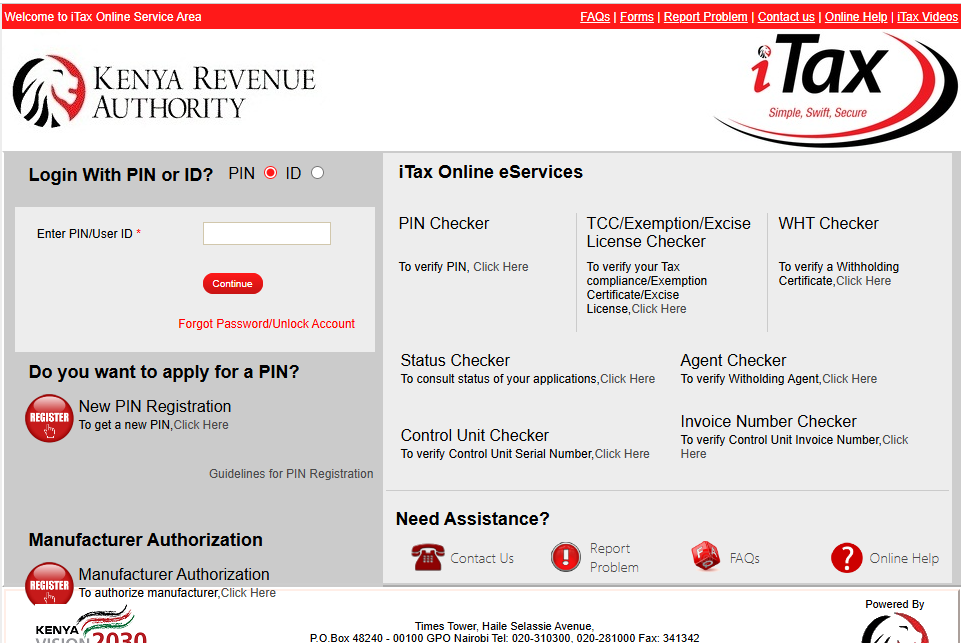
Open your browser and go to itax.kra.go.ke
Get High Paying Surveys
Earn money online by completing simple surveys. No experience needed.
Start Earning →You can do this on a phone, tablet, or computer. The portal works best on Google Chrome or Mozilla Firefox. If the page loads slowly, try refreshing or switching browsers.
On the homepage, you will see a login area on the right and navigation links on the left.
Step 2: Click on “New PIN Registration”
Do not try to log in yet — you do not have a PIN or password. Instead, look for the link that says “New PIN Registration” or “Do you want to register for a PIN?” on the login page.
Click it. This will open the PIN registration form.
Step 3: Select Your Taxpayer Type
You will be asked to select your taxpayer category:
- Individual — for Kenyan citizens registering personally
- Non-Individual — for companies, partnerships, trusts, NGOs, etc.
Select Individual if you are registering as a private person.
Step 4: Enter Your Personal Details
This is the main registration form. Fill in the following carefully:
- Tax obligation — select “Income Tax — Individual” as your primary obligation. You can add others later (e.g., VAT if you are a business owner)
- National ID number — enter your 8-digit ID number exactly as it appears on your card
- Date of birth — must match what is on your national ID
- First name, middle name, and surname — enter your name as it appears on your ID; do not abbreviate
- Gender
- Postal address — if you do not have a P.O. Box, you can use a nearby post office code for your area
- Town — your town of residence
- County
- Physical address — your home or work address (building name, road, and estate if applicable)
- Mobile number — use a Safaricom, Airtel, or Telkom number you regularly use
- Email address — this is critical; it will be used to send your PIN certificate and becomes your iTax login username. Use a personal email, not a shared one.
Take your time filling this form. Errors here are difficult to correct after submission and require you to visit a KRA office physically.
Step 5: Set Up Your Security Questions
After the personal details form, you will be asked to set up security questions. These are used to verify your identity if you ever forget your password or need to reset your account.
Choose questions you can easily remember and write down your answers somewhere safe.
Step 6: Review and Submit
Before submitting, review all your details carefully. Check:
- That your ID number is correct
- That your name matches your national ID exactly
- That your email is spelled correctly
- That your phone number is active
Once satisfied, click “Submit.”
Step 7: Receive Your KRA PIN Certificate
Within seconds to a few minutes, you will receive an email from KRA containing:
- Your KRA PIN number (e.g., A123456789B)
- A PDF PIN certificate as an attachment
- Your iTax login credentials (your email is the username; a temporary password is sent separately or in the same email)
Download and save the PIN certificate. Print a copy if possible — many institutions ask for a printed or PDF copy.
Step 8: Log In to iTax and Activate Your Account
Go back to itax.kra.go.ke and log in using:
- Username: your registered email address
- Password: the temporary password sent to your email
You will be prompted to change your password on first login. Choose a strong password (at least 8 characters, including a number and a symbol) and keep it private.
Once logged in, you are now a fully registered KRA taxpayer. Your account dashboard will show your PIN, your registered obligations, and filing history.
The KRA Login Guide: Accessing Your iTax Account After Registration
Once registered, here is how to log in to iTax going forward:
- Go to itax.kra.go.ke
- Enter your email address in the “PIN or User ID” field — or your KRA PIN itself
- Enter your password
- Enter the arithmetic captcha (e.g., 3 + 4 = ?)
- Click “Log In”
If you forget your password, click “Forgot Password” on the login page. You will be asked your security questions and a reset link will be sent to your registered email.
If you are locked out or your email has changed, you will need to visit a KRA service centre with your national ID to get your account reset.
Tax Obligations: What Happens After You Get Your PIN?
Getting your KRA PIN is just the first step. As a registered taxpayer, you are legally required to file tax returns every year, even if you had no income.
- Filing deadline: 30th June each year (for the previous calendar year)
- Nil returns — if you had no income, file a nil return. It takes less than 2 minutes on iTax
- Penalty for not filing: KES 2,000 per year for individuals who fail to file returns on time
- PAYE — if you are employed, your employer handles monthly tax deductions but you still file an annual return
To file your returns:
- Log in to iTax
- Go to “Returns” in the top menu
- Select “File Returns”
- Choose “Income Tax — Individual (IT1)”
- Download the Excel return form, fill it, and upload it back
Many Kenyans overlook annual filing, then get surprised by penalties when they try to apply for a job, loan, or tender. File your returns every year — even nil returns — to avoid this.
Fees and Processing Time
| Service | Fee | Processing Time |
|---|---|---|
| Individual PIN (new) | Free | Instant (same session) |
| Company / Non-Individual PIN | Free | 1–3 business days |
| PIN reactivation | Free | 1–3 business days |
| PIN cancellation / transfer | Free | Varies |
| Password reset (online) | Free | Instant |
| Account reset (office visit) | Free | Same day |
KRA PIN registration has been free since its inception and remains free in 2026. Be wary of anyone (online or in person) who asks you to pay to register for a KRA PIN — this is a scam.
Common Mistakes to Avoid
These are the most frequent errors that Kenyans make when applying for a KRA PIN online:
1. Using the wrong email address Your email address becomes your permanent iTax username. If you type it incorrectly, your PIN certificate will be sent to the wrong inbox and you will be unable to log in. Double-check before submitting.
2. Name mismatch with national ID The name you enter must match your national ID exactly, including middle names. Entering “John Kamau” when your ID says “John Kamau Njoroge” can cause your registration to have errors that are painful to fix later.
3. Registering twice Some people apply for a PIN, forget they did, and register again. The system will create a duplicate record which KRA must resolve manually. Always search your email inbox first — your old PIN certificate may still be there.
4. Using a shared or work email If you use your employer’s email to register, you lose access when you leave that job. Always use a personal email address.
5. Forgetting security question answers iTax uses security questions as part of password recovery. If you forget your answers, you cannot reset your password online and must visit a KRA office. Write your answers down somewhere secure.
6. Not filing annual returns after getting a PIN Registration does not mean your tax obligations are complete. The KRA system will flag you as non-compliant if you do not file annual returns. This can block you from getting a Tax Compliance Certificate (TCC) when you need one urgently.
7. Ignoring the confirmation email Some applicants complete the form but never check their email for the PIN certificate. Check your inbox, and also check the spam or junk folder — KRA emails sometimes land there.
Tips to Speed Up and Simplify the Process
- Use Google Chrome for the best compatibility with the iTax portal
- Register on a weekday morning — the portal is less congested between 8 AM and 10 AM
- Have your national ID in hand before you start — you will need the ID number and your date of birth
- Use a Gmail or Outlook address (these are reliable for receiving KRA emails)
- After registering, save your PIN certificate to Google Drive or email it to yourself so you never lose it
- If you plan to run a business, add VAT or Turnover Tax as a tax obligation at registration time to save yourself a separate amendment process later
Frequently Asked Questions (FAQs)
1. Can I apply for a KRA PIN without a national ID?
Kenyan citizens must have a national ID to register for a KRA PIN. If you are a foreign national, you can use a passport and alien ID instead. Students who have recently turned 18 but not yet obtained their ID cannot complete the process — get your national ID first.
2. I applied before but I have forgotten my KRA PIN. What do I do?
Log in to iTax and your PIN is visible on your dashboard. If you cannot log in, click “Forgot Password” to reset. If your email has changed, visit the nearest KRA service centre or Huduma Centre with your national ID to recover your account.
3. Is KRA PIN registration really free?
Yes, completely free. The iTax portal charges nothing for new PIN registration, password resets, or return filing. Anyone asking for payment to register your PIN is a fraudster.
4. How long does it take to get a KRA PIN after applying?
For individual applicants, the PIN is issued instantly after successful form submission. You receive it in your email within minutes. For companies, it may take 1–3 business days.
5. Do I need a KRA PIN if I am unemployed or a student?
Many institutions in Kenya require a KRA PIN even for non-employed individuals — including banks when opening accounts, and the government when issuing passports. It is advisable to register early, even if you are not yet earning income.
6. What is a Tax Compliance Certificate (TCC) and how is it different from a KRA PIN?
A KRA PIN identifies you as a taxpayer. A Tax Compliance Certificate (TCC) proves that you are up to date with your tax obligations. You need the TCC for government tenders, some jobs, and credit applications. You can only get a TCC if you have filed all your annual returns — which is why filing nil returns matters.
7. Can I update my details (email, phone, address) after registration?
Yes. Log in to iTax, go to “Registration” > “Amend PIN Details” and update your information. For major changes like name corrections or ID number changes, you may need to visit a KRA service centre.
Conclusion: Register Today — It Takes Less Than 20 Minutes
Getting your KRA PIN is one of the quickest and most valuable things you can do to set yourself up for financial life in Kenya. It costs nothing, takes under 20 minutes, and opens the door to banking, employment, business, property, and government services.
Go to itax.kra.go.ke right now, click “New PIN Registration,” have your national ID ready, and you will have your PIN certificate in your inbox before you finish your cup of tea.
Once you have your PIN, remember to file annual returns every year before 30th June — even if it is a nil return. That single habit will save you from penalties and keep your tax record clean for whenever you need a Tax Compliance Certificate.
Read also:
- How to Apply for a Driving License in Kenya
- How to Apply for a Passport in Kenya
- How to Register for SHA in Kenya
- How to Apply for a Kenyan ID Online
Get High Paying Surveys
Earn money online by completing simple surveys. No experience needed.
Start Earning →