How to Register for SHA in Kenya in 2026 (Step-by-Step Guide)

Get High Paying Surveys
Earn money online by completing simple surveys. No experience needed.
Start Earning →Social Health Authority (SHA) is Kenya’s mandatory public health insurance scheme that replaced the National Health Insurance Fund (NHIF) in October 2023. Every Kenyan — employed, self-employed, or informal sector worker — is required to register and contribute monthly.
Registration is free, done online via the SHA portal or eCitizen, and takes less than 30 minutes if you have the right documents. This guide walks you through everything: requirements, the exact steps, contribution rates, and how to log in to your SHA account.
What Is SHA and Why Does It Matter in Kenya?
The Social Health Authority (SHA) was established under the Social Health Insurance Act, 2023, as part of the government’s Universal Health Coverage (UHC) agenda. It replaced NHIF, which had been Kenya’s main public health insurer for decades.
SHA is not optional. The law requires all Kenyan citizens and legal residents to be registered members. Once registered, you and your dependants can access healthcare at public and contracted private facilities — from outpatient visits to major surgeries — with SHA covering a portion of the bill.
There are three funds under SHA:
- Social Health Insurance Fund (SHIF) — the main contributory fund for formal and informal sector workers
- Primary Healthcare Fund — covers basic outpatient care at community health centres
- Emergency, Chronic and Critical Illness Fund — covers emergencies, cancer, kidney dialysis, and other high-cost conditions
If you are not registered, you will pay out-of-pocket for most healthcare services at public hospitals. Registration protects you and your family from unexpected medical bills.
SHA Registration Requirements
Before you start the registration process, gather the following documents. Missing even one can delay your application.
For Kenyan Citizens
- National ID card (original and a clear copy)
- KRA PIN certificate (mandatory for all adults)
- Active phone number (the number must be in your name)
- Email address (optional but recommended for account recovery)
- Passport-size photo (for online upload — JPEG or PNG, under 1MB)
For Dependants
- Spouse: Copy of marriage certificate and their National ID
- Children under 18: Birth certificate for each child
- Children aged 18–24 in full-time education: School enrollment letter plus their ID or birth certificate
- Persons with disability: National Council for Persons with Disabilities (NCPWD) certificate
For Foreign Nationals
- Valid passport
- Work permit or residence permit
- KRA PIN (if applicable)
Cost of Registration
SHA registration itself is free of charge. You do not pay anything to sign up. What you pay is the monthly contribution, which begins after registration.
SHA Monthly Contributions in 2026
SHA contributions are income-based, not flat-rate like NHIF was. This was one of the biggest changes when SHA replaced NHIF.
For Formally Employed Kenyans (PAYE Employees)
The contribution is 2.75% of your gross monthly salary, deducted at source by your employer.
| Gross Monthly Salary | Monthly SHA Contribution |
|---|---|
| KES 10,000 | KES 275 |
| KES 30,000 | KES 825 |
| KES 50,000 | KES 1,375 |
| KES 100,000 | KES 2,750 |
| KES 200,000 | KES 5,500 |
There is no cap or ceiling on contributions — the 2.75% applies regardless of how high your salary is.
Get High Paying Surveys
Earn money online by completing simple surveys. No experience needed.
Start Earning →For Informal Sector and Self-Employed Workers
If you are self-employed, a casual worker, a trader, or work in the gig economy, you contribute a minimum of KES 300 per month (subject to government review). The government has indicated this minimum floor may be adjusted periodically.
For the Indigent and Vulnerable Populations
Kenyans who are too poor to contribute are enrolled under the Taifa Care programme and have their contributions paid by the government. This is determined through the Enhanced Single Registry (a social protection database). If you believe you qualify, apply through your local social welfare office or sub-county Social Development Office.
Note: Contributions are due by the 9th of every month for employees. Self-employed members should pay before the end of each month to maintain active cover.
How to Register for SHA in Kenya — Step-by-Step
There are two ways to register: online through the SHA portal or eCitizen, and offline at a Huduma Centre or SHA branch office. The online method is faster and available 24/7.
Method 1: SHA Online Registration (Recommended)
Step 1: Visit the SHA Registration Portal
Go to shif.sha.go.ke or access it through eCitizen at ecitizen.go.ke. If using eCitizen, log in to your account and search for “SHA Registration” under health services.
Step 2: Click on “Register as a Member”
On the SHA portal homepage, you will see a button labelled “New Member Registration” or “Register.” Click it to begin.
Step 3: Enter Your National ID Number
Type in your ID number and click “Verify.” The system will pull your basic details from the national population register — your full name, date of birth, and gender. Confirm that the details are correct before proceeding.
If your ID details do not match (a common problem for people who recently replaced lost IDs), you may need to visit a Huduma Centre to resolve the mismatch manually.
Step 4: Enter Your KRA PIN
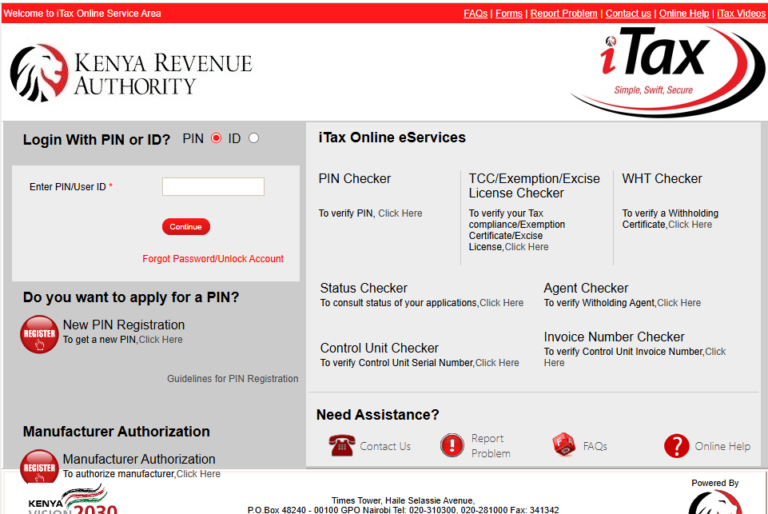
You will be prompted to enter your KRA PIN. The system cross-checks it with KRA’s iTax database to confirm it is active and linked to your ID. If you do not have a KRA PIN, stop here and get one first — visit itax.kra.go.ke to apply. It takes about 15 minutes online.
See also: How to Apply for a Kenyan ID Online in 2026: The Complete Step-by-Step Guide
Step 5: Provide Your Contact Details
Enter your mobile number and email address. The phone number must be active — a verification OTP (One-Time Password) will be sent to it. Enter the OTP in the field provided to confirm your number.
Step 6: Upload Your Passport Photo
Upload a clear, recent passport-sized photo. The file should be JPEG or PNG format and not exceed 1MB in size. Blurry or very dark photos are often rejected — use a plain background and good lighting.
Step 7: Add Your Dependants
After completing your own profile, you will be prompted to add dependants (spouse and children). For each dependant, enter their ID number (for adults) or birth certificate number (for children). Upload the relevant supporting documents for each person added.
You can add dependants during initial registration or later once your account is active.
Step 8: Select Your Preferred Health Facility
Choose a primary health facility where you will access services. This is typically a public hospital or health centre near you. You can change this later through your SHA account.
Step 9: Review and Submit
Go through all the information on the summary page carefully. Correct any errors before clicking “Submit.” Once submitted, you will receive a confirmation SMS with your SHA Member Number.
Step 10: Download Your SHA Card
Log in to your SHA account and navigate to “My Card” to download a digital version of your health card. You can also print it. Physical cards may be available at SHA offices, though the digital version is accepted at most facilities.
Method 2: SHA Offline Registration (Huduma Centre or SHA Office)
If you prefer to register in person, or if the online portal is giving you trouble, visit:
- Any Huduma Centre countrywide (Nairobi CBD, Westlands, Mombasa, Kisumu, Nakuru, etc.)
- SHA county offices (formerly NHIF offices — most have transitioned to SHA branding)
What to bring:
- Original National ID
- KRA PIN printout or certificate
- Passport photo (2 copies)
- Birth certificates of children (if adding dependants)
- Marriage certificate (if registering a spouse)
A SHA officer will capture your details and biometrics on the spot. You will receive your SHA number the same day. Processing at the counter usually takes 15–30 minutes, but queue times vary — arrive early.
How to Log In to Your SHA Account (SHA Login Guide)
Once registered, here is how to access your SHA account:
- Go to shif.sha.go.ke
- Click “Member Login” or “Login” on the top right
- Enter your ID number or SHA member number as your username
- Enter the password you created during registration
- Click “Login”
If you forgot your password, click “Forgot Password” and reset it using the OTP sent to your registered phone number.
From your dashboard, you can:
- Check your contribution history
- View your SHA member card
- Add or update dependants
- Update your preferred health facility
- Download receipts for contributions
SHA Registration Fees and Processing Time
| Item | Details |
|---|---|
| Registration fee | Free |
| Monthly contribution (employed) | 2.75% of gross salary |
| Monthly contribution (self-employed) | Minimum KES 300/month |
| Processing time (online) | Immediate — SHA number issued instantly |
| Processing time (offline/Huduma) | Same day (30 min to 2 hours depending on queues) |
| SHA card (digital) | Available immediately after registration |
Common Mistakes to Avoid When Registering for SHA
Many Kenyans encounter avoidable problems during SHA registration. Here are the most common ones:
1. Using a phone number not registered in your name SHA requires a verified phone number. If the Safaricom/Airtel/Telkom registration on the line does not match your ID, the OTP step will fail. Register the line in your name first or use a number that is already in your name.
2. Having an inactive or mismatched KRA PIN Some people registered their KRA PIN with a different name variation than what is on their ID. This causes a verification failure. Visit any KRA Taxpayer Service Centre to correct the name on your PIN before attempting SHA registration.
3. Uploading a poor-quality passport photo Low-resolution, dark, or selfie-style photos are rejected. Use a photo taken in good lighting against a white or plain background.
4. Adding dependants without the right documents Many parents try to add children using only their names, without a birth certificate number. Each child must have a birth certificate, and you must have the certificate number ready.
5. Not following up after submission Some applications stay in a “pending” state if there is a data mismatch. Log in to your SHA account 24 hours after submission to confirm your status. If it still shows “pending,” call SHA on 0800 720 601 (toll-free) or visit a Huduma Centre.
6. Missing monthly payments Your SHA cover can lapse if you miss contributions for 3 or more consecutive months. Set a reminder or use M-Pesa standing orders to pay automatically.
Tips to Speed Up Your SHA Registration
- Register during off-peak hours — early morning (7–9 AM) or late evening tend to have less traffic on the portal
- Have all documents scanned or photographed before starting — the session may time out if you step away to look for documents
- Use Google Chrome or Mozilla Firefox — the SHA portal works best on these browsers; avoid Internet Explorer
- Ensure your KRA PIN is active by logging in to iTax and confirming your tax status before starting SHA registration
- Use eCitizen if the SHA portal is slow — it accesses the same backend but sometimes loads faster
- Call ahead before visiting a Huduma Centre to confirm SHA services are available that day (some offices have specific SHA service days)
Frequently Asked Questions (FAQs)
1. Can I register for SHA without a KRA PIN? No. A KRA PIN is mandatory for all adult Kenyans registering for SHA. You must obtain one first through the KRA iTax portal before starting your SHA registration.
2. Is SHA the same as NHIF? No. SHA replaced NHIF in October 2023. NHIF no longer accepts new registrations or contributions. All previous NHIF members were automatically migrated to SHA, but you need to activate your SHA account and confirm your details on the new portal.
3. How do I pay my monthly SHA contributions? Self-employed members can pay via M-Pesa Paybill number 500500, using their SHA member number as the account number. For employed Kenyans, the employer deducts and remits contributions directly — you do not pay separately.
4. Can I use SHA at private hospitals? Yes, but only at SHA-contracted private facilities. SHA has agreements with many private hospitals and clinics. Before seeking treatment at a private facility, confirm it is on the SHA accredited list at shif.sha.go.ke or call SHA’s toll-free line.
5. What happens if I registered with NHIF but haven’t switched to SHA? Your NHIF records were migrated automatically. However, you must log in to the SHA portal, verify your details, and ensure your SHA account is active. Some migrated accounts have errors in phone numbers or IDs that need correction.
6. How many dependants can I add on my SHA cover? There is no stated cap on the number of dependants you can register. You can add a spouse and all biological or legally adopted children. However, all dependants must have valid documentation.
7. What if I cannot afford the SHA contributions? If you genuinely cannot afford contributions, apply to be enrolled under the government’s Taifa Care programme for indigent persons. Contact your local Sub-County Social Development Office or the Social Health Authority office in your county for guidance on how to apply.
Conclusion
SHA registration is straightforward once you have your National ID, KRA PIN, and a working phone number. The online process takes under 30 minutes, and your SHA member number is issued immediately. The key is to prepare your documents first, use a supported browser, and follow up on your application if you do not receive a confirmation SMS within 24 hours.
Do not put this off — being unregistered means paying full price for healthcare that SHA should cover. Start your registration today at shif.sha.go.ke or your nearest Huduma Centre.
Get High Paying Surveys
Earn money online by completing simple surveys. No experience needed.
Start Earning →