



Having trouble signing into your eCitizen account? You are not alone. eCitizen login problems in Kenya are among the most common frustrations Kenyans face when trying to access government services online. Whether you are dealing with an OTP that never arrives, a forgotten password, a locked account, or a page that simply refuses to load — this guide has you covered.
eCitizen is Kenya’s official government online services portal, managed by the Ministry of Information, Communications and the Digital Economy. It allows Kenyans to apply for passports, national IDs, driving licences, certificates of good conduct, and dozens of other services — all without visiting a government office.
In this step-by-step guide (updated for 2026), we walk you through every common eCitizen login problem in Kenya, how to reset your eCitizen password, how to resolve OTP issues, and how to get your account working again as fast as possible.
Quick Summary: eCitizen Login Issues at a Glance
📋 Featured Snippet — Key Facts
| Category | Details |
|---|---|
| Platform | eCitizen Kenya — ecitizen.go.ke |
| Requirements | National ID / Passport, registered phone number, active email |
| Cost | Free (no fee to reset or recover your account) |
| Processing Time | Instant (password reset link expires in 30 minutes) |
| OTP Validity | 5–10 minutes |
| Support Email | support@ecitizen.go.ke |
| Support Phone | 020 222 1221 |
| Working Hours | eCitizen: 24/7 · Support: Mon–Fri 8AM–5PM |
| Important Note | Use the same phone number / email registered during account creation |
Why Do eCitizen Login Problems Happen in Kenya?
Before jumping into solutions, it helps to understand why eCitizen not working in Kenya is such a common complaint. The most frequent causes include:
- Entering the wrong password or email address
- Using a phone number different from the one registered on eCitizen
- OTP messages blocked by your mobile network or delivered late
- eCitizen server downtime or scheduled maintenance
- Browser compatibility issues (older browsers or extensions blocking the site)
- Account suspension after too many failed login attempts
- Using a VPN that conflicts with the eCitizen portal
Understanding the root cause makes it much easier to apply the right fix. Let’s work through each scenario in detail.
How to Log Into eCitizen Kenya: Standard Steps
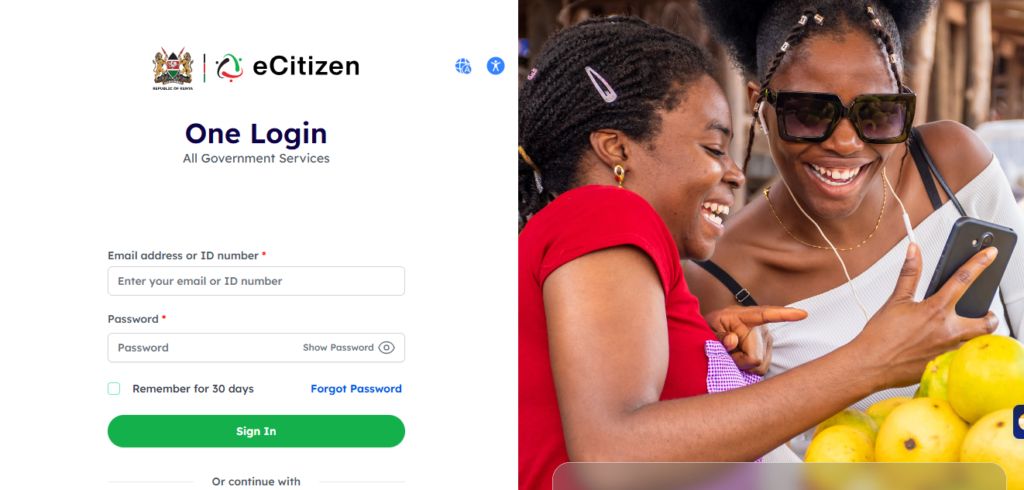
If you are unsure whether you are following the correct process, here is the standard eCitizen login procedure:
- Open your browser (preferably Google Chrome or Mozilla Firefox) and go to ecitizen.go.ke.
- Click the ‘Sign In’ button on the top-right corner of the homepage.
- Enter your registered email address and password.
- Click ‘Sign In’. If Two-Factor Authentication (2FA) is enabled, you will receive an OTP on your registered phone number or email.
- Enter the OTP in the field provided and click ‘Verify’.
- You will now be taken to your eCitizen dashboard where you can access all government services.
💡 Pro Tip: Always use a computer or a stable Wi-Fi connection when accessing eCitizen for the first time. Mobile data connections can sometimes cause session timeouts during the login process.
How to Reset Your eCitizen Password in Kenya (Step-by-Step)
Forgetting your password is the single most common eCitizen login problem in Kenya. Here is exactly how to reset it in 2026.
Step 1: Go to the eCitizen Login Page
Open ecitizen.go.ke in your browser and click ‘Sign In’ at the top right of the page.
Step 2: Click ‘Forgot Password’
Below the password field, click the link that says ‘Forgot Password?’. This takes you to the account recovery page.
Step 3: Enter Your Registered Email Address
Type in the email address you used when creating your eCitizen account. Double-check for typos, then click ‘Submit’ or ‘Send Reset Link’.
Step 4: Check Your Email Inbox
Open your email inbox and look for a message from no-reply@ecitizen.go.ke. The subject line will read something like “Password Reset Request”. If you do not see it within 5 minutes, check your Spam or Junk folder.
Step 5: Click the Reset Link
Inside the email, click the password reset link. This link is only valid for 30 minutes, so act quickly. You will be taken to a page where you can create a new password.
Step 6: Create a New Password
Enter your new password twice to confirm. A strong password should be at least 8 characters and include uppercase letters, numbers, and a special character (e.g., @, #, !). Click ‘Save’ or ‘Update Password’.
Step 7: Log In with Your New Password
Return to ecitizen.go.ke and sign in using your email and your new password. You should now have full access to your eCitizen account.
💡 Pro Tip: After resetting your password, save it in a trusted password manager such as Google Password Manager or Bitwarden. This prevents future lockouts and keeps your account secure.
eCitizen OTP Issues: Why You Are Not Receiving the Code
eCitizen OTP issues are one of the most reported eCitizen login problems in Kenya. The OTP (One-Time Password) is a 6-digit code sent to your registered phone number or email to verify your identity during login.
If the OTP Is Not Coming to Your Phone
- Ensure your phone has a strong network signal and is not in Airplane Mode or Do Not Disturb mode.
- Confirm you are expecting the SMS on the exact number registered with eCitizen — the portal only sends to the original number on file.
- Check if your SMS inbox is full and delete some messages to free up space.
- Wait at least 3 minutes before requesting a new OTP — do not click ‘Resend’ repeatedly, as this can cause delays.
- If using a Safaricom line, ensure message blocking is not active. Dial *100*7*3# to check your Safaricom message settings.
If the OTP Is Not Coming to Your Email
- Check your Spam / Junk folder — eCitizen emails are frequently filtered as spam.
- Search your inbox for emails from ecitizen.go.ke or no-reply@ecitizen.go.ke.
- If using Gmail, also check the Promotions and Updates tabs.
- Ensure you are checking the correct email account — the one you registered on eCitizen.
⚠️ Note: If you have completely lost access to both your registered phone number and email, you must contact eCitizen support directly and provide your National ID to recover your account. You cannot reset OTP delivery channels on your own in this situation.
eCitizen Not Working Kenya: Common Problems and Solutions
Use the table below as your quick-reference guide to the most common eCitizen troubleshooting scenarios.
| Problem | Solution |
|---|---|
| eCitizen not loading / site down | Check @ecitizenkenya social pages for outages. Clear browser cache (Ctrl+Shift+Delete). Try incognito mode or a different browser. Wait 30–60 minutes if server is down. |
| OTP not received on phone | Check signal, confirm correct number, clear SMS inbox, wait 3 minutes, then request again. |
| OTP not received on email | Check Spam/Junk folder, verify correct email, search for ecitizen.go.ke sender. |
| Forgot eCitizen email address | Email support@ecitizen.go.ke with your National ID number to recover your registered email. |
| Password reset link not working | Links expire after 30 minutes. Request a fresh link and click it immediately in the same browser. |
| Account locked after failed attempts | Wait 30 minutes and retry. If still locked, email eCitizen support with your ID number. |
| Login page redirects or freezes | Disable VPN if active. Clear cookies for ecitizen.go.ke. Switch to Chrome or Firefox. |
| Wrong phone number registered | Contact eCitizen support with your National ID and proof of ownership of the new number. |
eCitizen Troubleshooting: Browser and Technical Fixes
Many eCitizen login problems in Kenya are caused by browser-related issues that are easy to fix yourself. Work through the steps below.
Clear Browser Cache and Cookies
- Open your browser and press Ctrl + Shift + Delete (Windows) or Cmd + Shift + Delete (Mac).
- Set the time range to ‘All time’.
- Check ‘Cached images and files’ and ‘Cookies and other site data’.
- Click ‘Clear data’, then refresh the eCitizen page.
Try Incognito / Private Mode
Press Ctrl + Shift + N (Chrome) or Ctrl + Shift + P (Firefox) to open a private window. Navigate to ecitizen.go.ke and try logging in. Incognito mode bypasses cached data and any browser extensions that could be blocking the portal.
Disable Browser Extensions
Ad blockers, VPN extensions, and script blockers can interfere with eCitizen. In Chrome, go to Menu → More Tools → Extensions and toggle off all active extensions, then try again.
Use a Supported Browser
eCitizen works best on the latest version of Google Chrome or Mozilla Firefox. Avoid Internet Explorer, outdated Opera versions, or some built-in Android browsers.
💡 Pro Tip: If eCitizen is loading slowly or not responding, check downdetector.co.ke or the @ecitizenkenya Twitter/X page for maintenance announcements before spending time troubleshooting on your end.
Tips to Avoid eCitizen Login Problems in the Future
Prevention is always better than cure. Keep these habits to ensure your account stays accessible.
- Use a personal, permanent email address (not a work email that might be deactivated) when registering on eCitizen.
- Keep your registered phone number active — if you change numbers, update your eCitizen profile immediately.
- Use a strong, unique password and save it in a password manager.
- Never share your eCitizen login credentials with anyone, including agents offering to help with applications.
- Log out after every session, especially on shared computers or public Wi-Fi networks.
- Enable email notifications from eCitizen to stay updated on application statuses and security alerts.
- Log in to your account periodically even when you do not need a service — this keeps your credentials fresh in memory and ensures your contact details are current.
Latest Updates: eCitizen Kenya 2026
The eCitizen platform has undergone significant improvements in 2025–2026. Here is what has changed:
- Faster OTP Delivery: The government worked with Safaricom, Airtel, and Telkom to reduce OTP delivery times from several minutes to under 60 seconds in most cases.
- Self-Service Account Recovery: Users can now verify their identity using their National ID number and biometric details to recover a locked account without calling support.
- Upgraded Server Capacity: Following repeated downtime complaints, especially during peak hours, eCitizen upgraded its infrastructure to handle significantly higher traffic volumes.
- Improved Mobile App: The eCitizen mobile app (Android and iOS) received a major update improving login stability and introducing fingerprint login support on compatible devices.
- Huduma Namba Integration: eCitizen accounts are progressively being linked with the Huduma Namba (Unique Personal Identifier) system for smoother multi-service access.
How to Contact eCitizen Support in Kenya
If you have tried all the steps in this guide and are still experiencing eCitizen login problems, reach out to support through the following channels:
- 📧 Email: support@ecitizen.go.ke — Include your full name, National ID number, registered email, and a description of the problem. Attach a screenshot if possible.
- 📞 Phone: 020 222 1221 — Available Monday to Friday, 8:00 AM to 5:00 PM.
- 🏢 Huduma Centres: Visit any Huduma Centre across Kenya with your original National ID for in-person assistance.
- 🐦 Social Media: @ecitizenkenya on Twitter/X and Facebook for outage updates and general queries.
⚠️ Note: Email responses can take 2–5 working days. For urgent matters — such as an upcoming deadline for a passport or good conduct certificate — visit a Huduma Centre in person for faster resolution.
Frequently Asked Questions (FAQs)
1. Why can’t I log into my eCitizen account in Kenya?
The most common reasons include entering the wrong password, using the wrong email address, account lockout after failed attempts, or the eCitizen portal being temporarily down. Follow the troubleshooting steps in this guide to identify and resolve the issue.
2. How do I reset my eCitizen password in Kenya?
Go to ecitizen.go.ke, click ‘Sign In’, then click ‘Forgot Password’. Enter your registered email and click ‘Submit’. A reset link will be sent to your inbox — it expires in 30 minutes, so use it immediately.
3. I am not receiving the eCitizen OTP. What should I do?
Check your network signal and confirm your phone is not in Airplane Mode. Make sure you are expecting the OTP on the number registered with eCitizen. Check your SMS inbox capacity, wait 3 minutes, and request a new code. For email OTPs, check your Spam folder.
4. How long does it take to receive the eCitizen OTP?
Under normal conditions, the OTP arrives within 30–60 seconds via SMS and 1–3 minutes via email. During high-traffic periods, it may take up to 5 minutes. If nothing arrives after 5 minutes, request a new code.
5. Is eCitizen Kenya down today?
Visit downdetector.co.ke or check @ecitizenkenya on Twitter/X for real-time status. You can also try the site in incognito mode or from a different device to rule out browser-specific issues.
6. My eCitizen account is locked. How do I unlock it?
Your account may lock after multiple failed login attempts. Wait 30 minutes and retry. If still locked, email support@ecitizen.go.ke with your National ID and registered contact details. You can also visit any Huduma Centre with your original ID.
7. Can I use eCitizen without a registered phone number?
You need a registered phone number or email to complete the OTP verification step when logging in. If you no longer have access to your registered number, contact eCitizen support to update your details before you can regain access.
8. How do I update my phone number on eCitizen?
Log into your account, go to ‘My Profile’ or ‘Account Settings’, and update your phone number there. If you are locked out, contact eCitizen support with your National ID to request a manual update.
Conclusion
eCitizen login problems in Kenya are frustrating — especially when you are racing against a deadline for a passport, driving licence, or other government service. But the vast majority of login issues are fixable without needing to visit a government office.
To summarise the key takeaways from this guide: always use the correct email and phone number registered on your account, reset your password immediately if forgotten (the reset link expires in 30 minutes), check your Spam folder for OTP emails, clear your browser cache if the portal is unresponsive, and contact eCitizen support for anything you cannot resolve on your own.
The eCitizen platform continues to improve in 2026 — with faster OTP delivery, better mobile app performance, and easier account recovery options. As long as you keep your contact details up to date and follow good password hygiene, eCitizen login problems should become a rare occurrence.
👉 Ready to get back in? Head to ecitizen.go.ke and start your application today. Your government services are just a few clicks away.
Read also:
