






Kenya’s government has fully embraced digital service delivery, and the eCitizen portal sits at the heart of it all. If you’ve been wondering how to register an eCitizen account in Kenya, you’re in the right place. Whether you need a passport, a good conduct certificate, a driving licence, or a business registration, it all starts with one account on eCitizen.
This updated 2026 guide walks you through everything — from what you need, to each click of the registration process, to solving common problems that trip people up. By the end of it, you’ll have a verified eCitizen account ready to use.
What Is eCitizen Kenya and Why Do You Need an Account?
eCitizen (ecitizen.go.ke) is the official Government of Kenya online services portal. It brings together over 16,000 services from more than 100 government ministries, departments, and agencies — all in one place.
Before eCitizen, Kenyans had to physically visit different government offices, queue for hours, and sometimes make multiple trips just to submit paperwork. Today, most of those services can be applied for, paid for, and tracked entirely online.
You need an eCitizen account if you want to:
- Apply for or renew a Kenyan passport
- Get a Police Clearance Certificate (Good Conduct)
- Apply for an NTSA driving licence or logbook
- Register a business name or company
- Apply for a birth, death, or marriage certificate
- Access NHIF, NSSF, or KRA services linked to the portal
Without an eCitizen account, you simply cannot access these services online. Creating one is completely free and takes less than 10 minutes.
Quick Summary: eCitizen Account Registration at a Glance
| Detail | Information |
|---|---|
| Cost of Registration | Free (KES 0) |
| Time to Complete | 5–10 minutes |
| Where to Register | accounts.ecitizen.go.ke |
| Requirements | National ID, phone number, email |
| Who Can Register | Kenyan citizens, foreign residents, refugees, diplomats |
| Payment Methods (for services) | M-Pesa, Airtel Money, debit/credit card |
| Account Types | Citizen, Foreigner Resident, Refugee, Diplomat, Visitor |
Important Note: While creating an eCitizen account is free, individual government services accessed through the portal have their own fees. Always confirm the exact fee on the portal before paying.
eCitizen Registration Requirements in Kenya
Before you start the eCitizen signup process, make sure you have the following ready:
For Kenyan Citizens:
- ✅ Valid Kenyan National ID (must be the original issued card — not an acknowledgement slip)
- ✅ Active mobile phone number registered in your name (Safaricom, Airtel, or Telkom)
- ✅ A working personal email address
- ✅ Reliable internet connection (mobile data or Wi-Fi)
For Foreign Residents:
- ✅ Valid Alien ID / Foreigner Certificate number
- ✅ Mobile number and email address
For Refugees:
- ✅ Valid Refugee Certificate number
Pro Tip: Make sure the phone number you use is registered in your name with your mobile provider. eCitizen sends a One-Time Password (OTP) to verify your identity, and if the SIM isn’t registered to you, the process may fail.
How to Register an eCitizen Account in Kenya: Step-by-Step (2026)
Follow these steps carefully. Each one matters.
Step 1: Go to the Official eCitizen Website

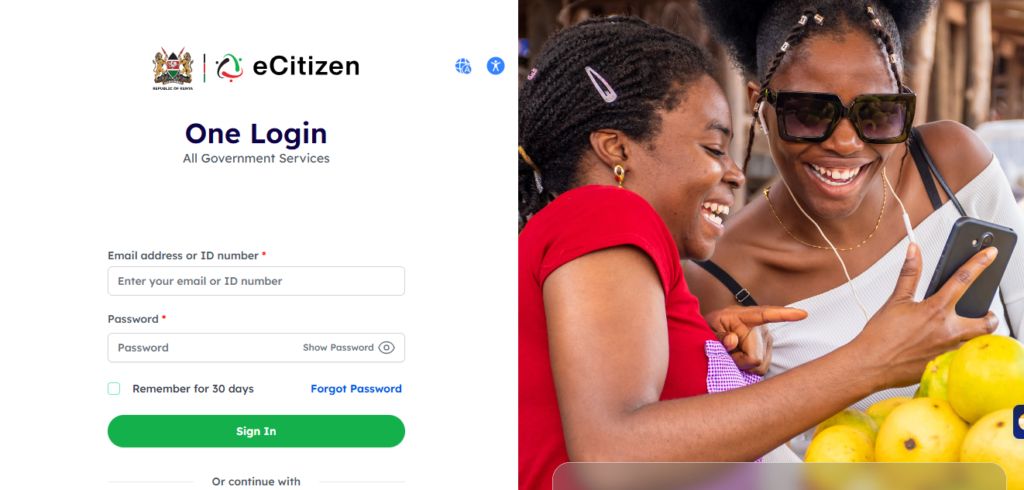
Open your browser and go to: 👉 https://accounts.ecitizen.go.ke
Always double-check that you are on the official government URL (ends in .go.ke). Fraudulent websites that mimic eCitizen exist — do not enter your personal information anywhere else.
Step 2: Click “Create an Account”
On the homepage, you’ll see a “Create an Account” or “Register” button. Click it.
You’ll be asked to select your account type:
- Citizen – For Kenyan citizens with a National ID
- Resident – For foreign nationals living in Kenya with an Alien ID
- Refugee – For registered refugees with a Refugee Certificate
- Diplomat – For diplomats within Kenya
- Foreigner/Visitor – For non-residents visiting Kenya
Most users should select Citizen.
Step 3: Enter Your National ID Number
Type in your National ID number (the 8-digit number on your ID card).
The system will cross-reference this with the government’s records. Make sure you enter the correct number — a wrong ID number means the system won’t find your records and registration will fail.
Step 4: Fill in Your Personal Details
You’ll be prompted to enter:
- Full name (exactly as it appears on your ID)
- Date of birth
- Gender
- Email address
- Mobile phone number
⚠️ Common Mistake: Many people type their name slightly differently from their ID — for example, using a nickname or middle name variation. Use the exact name on your National ID. Mismatches can cause verification failures or application rejections later.
Step 5: Verify Your Phone Number via OTP
After filling in your details, click “Send OTP” or “Verify.”
You’ll receive a One-Time Password (OTP) via SMS to the phone number you entered.
- Enter the OTP in the field provided
- OTPs typically expire within 5 minutes — enter it quickly
- If you don’t receive the OTP within 1–2 minutes, check your network, then click “Resend OTP”
Step 6: Create a Strong Password
Choose a secure password for your account. A strong password should have:
- At least 8 characters
- A mix of uppercase and lowercase letters
- At least one number
- At least one special character (e.g., @, #, !, %)
Example of a strong password: Kenya@Secure2026
Write it down somewhere safe or use a password manager. You’ll need it every time you log in.
Step 7: Verify Your Email Address
Check your inbox for a verification email from eCitizen. Click the link inside to confirm your email address.
- Check your Spam or Junk folder if you don’t see it in your inbox
- The link may expire after 24 hours — verify promptly
Step 8: Log In to Your New eCitizen Account
Once your email is verified, return to the eCitizen portal and click “Sign In.”
Enter:
- Your National ID number (or email)
- Your password
Click “Login” — and you’re in. Your eCitizen account is now ready to use.
How to Access Government Services After Registration
Once logged in, here’s how to navigate to a specific service:
- From the dashboard, browse or search for the service you need
- Select the relevant government department (e.g., Immigration, NTSA, DCI)
- Choose the specific service (e.g., Passport Application, Good Conduct)
- Fill in the application form
- Upload any required documents
- Pay the applicable fee via M-Pesa, Airtel Money, or card
- Print your payment receipt and any confirmation documents
- Track your application status from the dashboard
eCitizen Registration Fees
| Service | Cost |
|---|---|
| Creating an eCitizen Account | Free |
| Passport Application (Adult) | KES 4,550 (standard) |
| Good Conduct Certificate | KES 1,050 |
| Driving Licence (NTSA) | Varies by category |
| Business Name Registration | KES 950 (sole proprietor) |
| Company Registration (Pvt Ltd) | KES 10,650 (baseline) |
| Birth Certificate | KES 50–200 |
Disclaimer: Service fees are set by individual government departments and may change without notice. Always confirm the exact payable amount shown on your eCitizen invoice before making payment.
Accepted Payment Methods:
- M-Pesa (most popular and recommended)
- Airtel Money
- Debit card (Visa/Mastercard)
- Credit card
How Long Does eCitizen Registration Take?
The registration process itself takes under 10 minutes if you have all your details ready.
Individual service processing times vary:
| Service | Typical Processing Time |
|---|---|
| eCitizen Account Creation | Instant |
| Good Conduct Certificate | 3–7 working days |
| Passport (Standard) | 10–21 working days |
| NTSA Smart DL | 7–14 working days |
| Business Name Registration | 1–3 working days |
| Company Registration | 3–5 working days |
Processing times can be affected by incomplete applications, high application volumes, or public holidays. Always submit complete, accurate information to avoid delays.
Common eCitizen Problems and How to Fix Them
1. “ID Already Registered” Error
What it means: Your National ID number is already linked to an existing account.
Solution:
- Go to the eCitizen login page
- Click “Forgot Password?”
- Enter your ID number or registered email
- Follow the reset instructions sent to your email or phone
- If you believe your ID was fraudulently used, contact eCitizen support at support@ecitizen.go.ke
2. OTP Not Received
What it means: The verification SMS didn’t arrive.
Solutions:
- Confirm your phone number has network coverage
- Check that the number you entered is correct
- Restart your phone and wait 2 minutes
- Click “Resend OTP”
- If using a Safaricom line, dial *100# to confirm the number is active
3. eCitizen Website Not Loading / Portal Down
What it means: The portal may be under maintenance or experiencing high traffic.
Solutions:
- Try accessing the site using a different browser (Chrome, Firefox, Edge)
- Clear your browser’s cache and cookies
- Switch from mobile data to Wi-Fi, or vice versa
- Try again after 30 minutes — the portal occasionally undergoes scheduled maintenance
- Check the official eCitizen social media pages for maintenance announcements
4. Payment Not Reflecting on eCitizen
What it means: You paid via M-Pesa but the portal hasn’t confirmed payment.
Solutions:
- Wait up to 30 minutes — M-Pesa payments can take time to reflect
- Check your M-Pesa message for the transaction confirmation code
- Do not pay again without confirming the first payment failed
- Call M-Pesa support on 234 or eCitizen support if payment doesn’t reflect after an hour
- Keep your M-Pesa confirmation SMS as proof of payment
5. Account Locked After Failed Login Attempts
What it means: Too many wrong password attempts have temporarily locked your account.
Solutions:
- Wait 30 minutes for the account to automatically unlock
- Use the “Forgot Password” feature to reset your password
- Set a new, memorable password and save it securely
6. Login Issues — “Invalid Credentials”
What it means: Your ID number or password is incorrect.
Solutions:
- Double-check you’re entering your ID number (not your name or email) in the ID field
- Make sure Caps Lock is not on when typing your password
- Use the password reset option if you’re unsure of your password
Tips to Avoid Rejection or Delays on eCitizen
- Match your details exactly to your ID. Your name, date of birth, and ID number must match your National ID precisely.
- Use a personal email address. Avoid using shared or work emails — you’ll need exclusive access to the inbox for verification and updates.
- Keep your phone number accessible. OTPs expire fast. Have your phone in hand when registering.
- Don’t refresh the page mid-process. Refreshing during OTP entry or form submission can cause errors. Be patient and wait for the page to load.
- Use a stable internet connection. Poor connectivity during registration can cause timeouts. If you’re on mobile data, move to an area with a strong signal.
- Save your login credentials. Use a password manager or write down your ID number and password. Account recovery can be time-consuming.
- Register before you need the service. Don’t wait until you urgently need a passport or certificate to create your account. Register now so you’re ready.
Latest eCitizen Updates (2026)
- Integrated services: eCitizen now hosts over 16,000 services from 100+ government agencies, making it the most comprehensive government portal in East Africa.
- Improved mobile experience: The portal has been optimised for smartphones, making eCitizen signup steps more seamless on smaller screens.
- M-Pesa integration remains primary: M-Pesa continues to be the dominant and most reliable payment method on the platform.
- Enhanced security: Two-factor authentication (OTP) is now mandatory for all new registrations and sensitive account actions.
- eCitizen for businesses: Business owners can now manage multiple services — from company registration to tax compliance — through a single eCitizen account.
FAQs: How to Register an eCitizen Account in Kenya
Q1: Is creating an eCitizen account free? Yes, creating an eCitizen account in Kenya is completely free. You only pay fees when applying for specific government services such as a passport or good conduct certificate.
Q2: What do I need to create an eCitizen account in Kenya? You need a valid Kenyan National ID, a mobile phone number registered in your name, and an active email address. Foreign residents can use their Alien ID instead.
Q3: How long does eCitizen registration take? The eCitizen signup process takes less than 10 minutes if your details are correct and you have your documents ready.
Q4: Can I register on eCitizen using my phone? Yes. The eCitizen portal works on smartphones through a mobile browser. You don’t need to download an app — simply visit accounts.ecitizen.go.ke on your phone.
Q5: What if my National ID number is already registered on eCitizen? Use the “Forgot Password” option on the login page to recover access to the existing account. If you suspect fraudulent use, contact eCitizen support immediately.
Q6: Can foreigners create an eCitizen account? Yes. Foreign residents in Kenya can create an eCitizen account using their Alien ID or Foreigner Certificate number.
Q7: What services can I access on eCitizen after registration? Once registered, you can access passport applications, NTSA driving licence services, business registration, police clearance certificates, birth certificates, NHIF, NSSF services, and much more.
Q8: What if I forget my eCitizen password? Click “Forgot Password” on the login page, enter your registered email or ID number, and follow the reset link sent to your email or phone.
Related Articles You May Find Helpful
- [How to Apply for a Kenyan Passport on eCitizen (2026 Guide)] — Step-by-step guide to applying for or renewing your passport online
- [How to Get a Good Conduct Certificate (Police Clearance) on eCitizen] — Everything you need to know about the DCI certificate process
- [How to Replace a Lost National ID Card in Kenya via Huduma Centre] — What to do when your ID is lost or damaged
Conclusion
Knowing how to register an eCitizen account in Kenya is one of the most useful things you can do as a Kenyan citizen or resident in 2026. With a single free account, you gain access to hundreds of government services — from the comfort of your home, at any time of day.
The process is straightforward: visit accounts.ecitizen.go.ke, select your account type, enter your National ID details, verify your phone and email, and set a password. That’s it. The whole thing takes less than 10 minutes.
Don’t wait until you urgently need a government service to set up your account. Start your eCitizen registration today and be ready when you need it most.
👉 Register now at: https://accounts.ecitizen.go.ke


